Very strange... if Work Mode is set to Ch Name and you don't put a name in for a channel, the display of the radio will have "nothing".... yes this is a real nothing... displayed other than the other details as are on other memory channels.
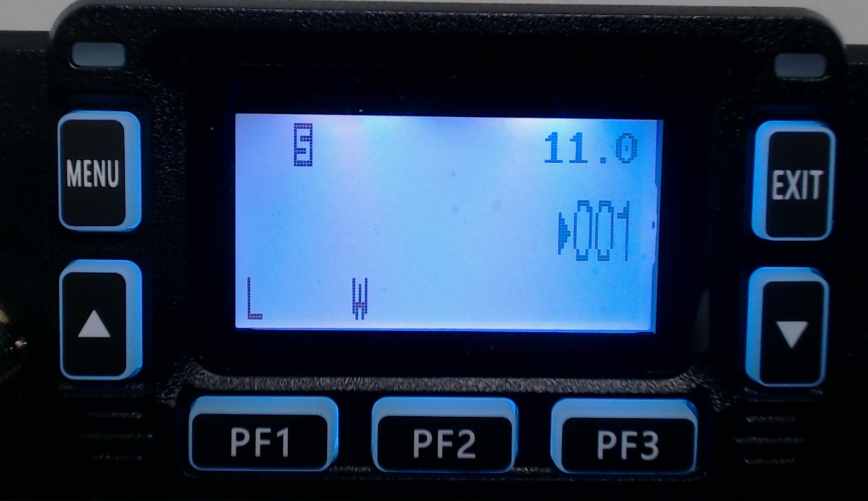
Don't let it worry you. You did not harm your radio. You have two choices for the correction
- Enter a name for the channel on the Memories page.
- Change the option for display in the Settings (Settings | Radio Menu | Work Mode
- The options for Work Mode are
- VFO - The radio operates in VFO Mode
- Ch Num - CH## is displayed where ## is the channel number
- Ch Freq - The channel number (as seen on the right) and the Frequency of that channel are displayed
- Ch Name - The channel number (as seen on the right) and the Name for that channel are displayed.
- The options for Work Mode are
Ch Name is the default for this option.
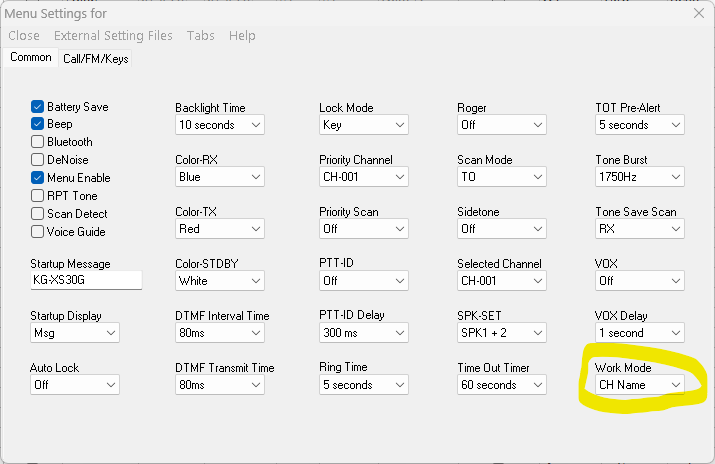
Note: The KG-XS20G has the same option and works the same way. However, the option is on a different Settings screen. Go to Settings | Radio Menu Settings | Common 2 | VFO | Work Mode. You will find the same options there.
07/23/2026
Was this article helpful?
That’s Great!
Thank you for your feedback
Sorry! We couldn't be helpful
Thank you for your feedback
Feedback sent
We appreciate your effort and will try to fix the article