We recently learned that the 9700 has a TX Inhibit feature. This is not something you typically find on a Yaesu/Kenwood/Icom ham radio and, to be fair, it works a bit strangely in the 9700. The radio allows the user to set up custom band edges. You'll find this in the radio via "Menu > Set > Function > User Band Edge" and in your RT Systems programmer via "Settings > Radio Menu Settings > Band Settings." Image from the Windows version of the RT Systems programmer below. The Mac version will look different to a degree but will have all the same options.
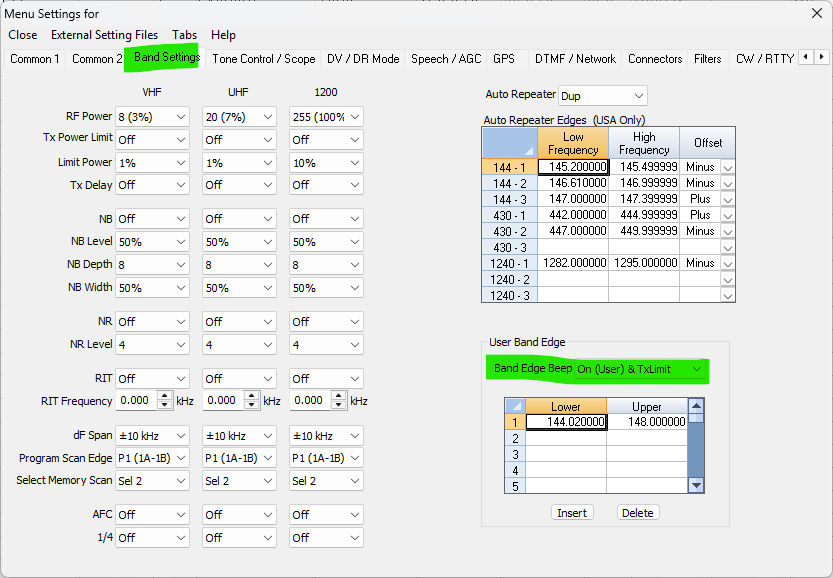
The odd part is that "User Band Edge Beep" setting. It determines which band edges the radio will use and how it will notify you about your operation within that frequency range. There's one particularly sneaky option to be aware of. "Band Edge Beep" as highlighted above and currently set to "On (User) & TX Limit." You'll find this exact same option in the radio's menu as well. The "TX Limit" is the important bit. If you select this option you are telling your radio "please only transmit within the frequency ranges I set up below and nowhere else."
We had a customer send us a programming file for his radio recently with the note that his radio would not transmit on any 440 frequency after programming. This setting is why. The image above is from his file. You can see he only has a range set up for VHF so his radio will not TX on 440 at all. If we were to change the band edge beep setting to something else or even just add a 440 frequency range to the list the radio would start working normally again.
Was this article helpful?
That’s Great!
Thank you for your feedback
Sorry! We couldn't be helpful
Thank you for your feedback
Feedback sent
We appreciate your effort and will try to fix the article